Verifying Agentic Development at Scale
3 months ago, I joined Cognition to help build the future of software engineering. Devin has come a long way since launching as the first AI software engineer, and I’ve been blown away watching the team behind it actually use Devin every day.
One thing that stood out was how Devin uses its computer to verify work autonomously in the cloud. From validating our Slack integration to testing complex Windsurf features, the team always has an army of Devins in test mode. In this post, I’ll share why we are so focused on end-to-end cloud agent verification and how we’re approaching building it.
The shift to async software engineering
At Cognition, we recently reached a new milestone. For the first time, more Devins are being triggered asynchronously, via events, automations, schedules, and other Devins. We expect this to continue to accelerate with our recent launch of Auto-Triage.
As we transition to this async world, it is crucial developers are able to come back to verified results that are ready to be merged. Earlier this year we launched Devin Review, a code review tool that scales human understanding of complex code diffs. It doesn’t just flag bugs - Devin closes the loop by fixing each finding until the diff comes back clean. But a clean review alone often isn’t enough - engineers want to see the change tested end to end, the same way they would test it themselves.
It’s a great feeling when Devin puts up a PR fixing a user complaint before you had the chance to even see the message in the bug channel. What makes it magical is when that PR comes with proof that the fix actually works. And this magic may soon become a necessity - as more PRs come from the rise of proactive agents, unverified changes will quickly become unmanageable.
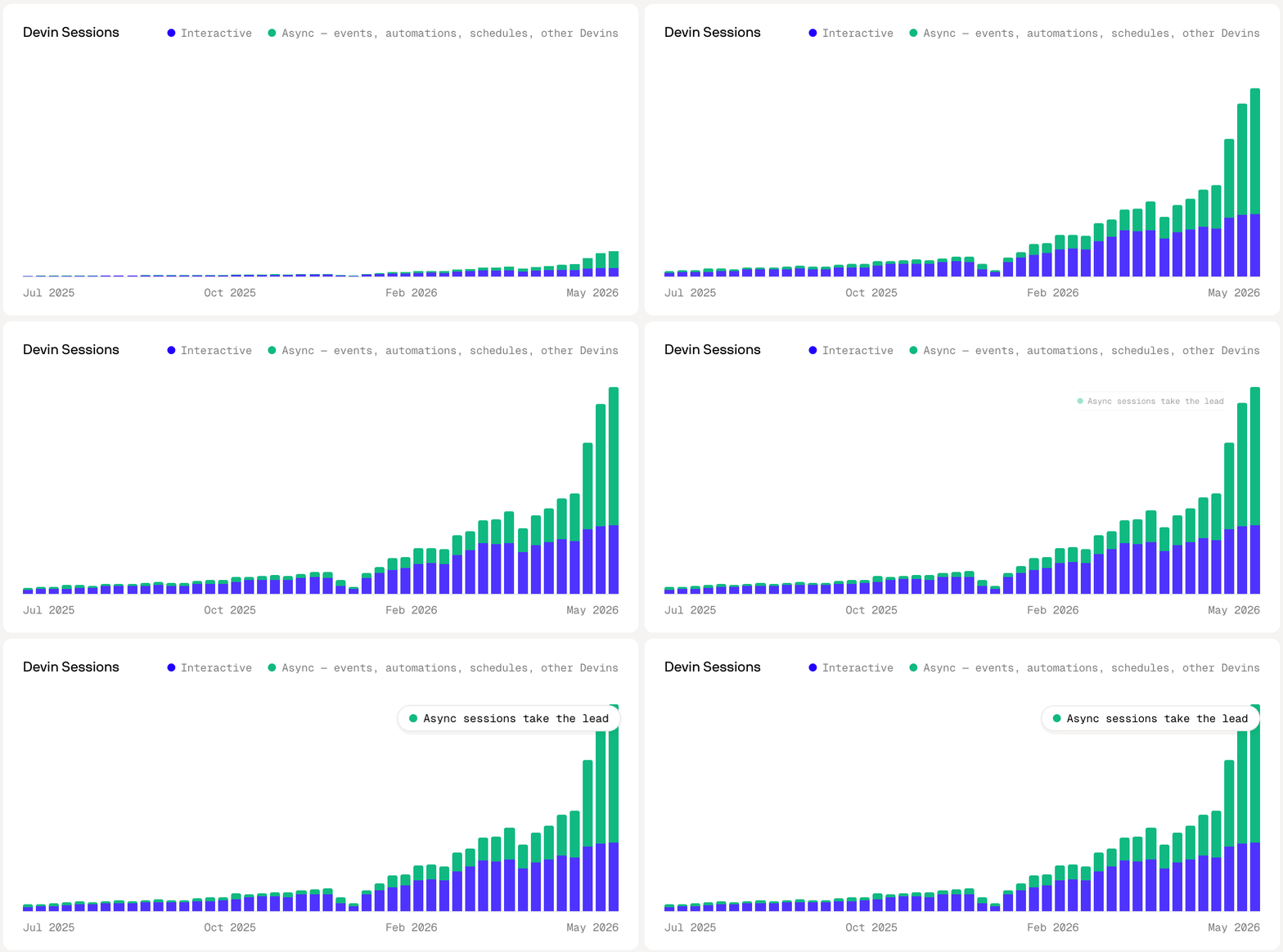
For the first time, more Devin sessions are triggered asynchronously than interactively.
From the Beginning
Since Devin launched, it has always been able to demonstrate its work on a cloud virtual machine. Around 6 months ago, we expanded Devin’s computer use capabilities. What this means in practice is that we added tools to Devin’s harness to take screenshots, move the mouse, click, drag, type, press keys, scroll, wait, zoom, and start/stop recording. Computer use has been around for a while now, but we felt the latest cohort of models from the frontier labs has started to really get good at utilizing these tools.
The computer use unlocked some fun new capabilities for Devin, like building and playing a desktop game, or using its browser to order products on Amazon. But the real unlock we noticed was Devin’s ability to test its own work. Devin will spin up the app, click through it, and confirm its changes actually work, the same way an engineer would. Everything runs in the cloud and can scale out in parallel. This really hit me when I saw engineers running 10 to 20 Devins in parallel, each with its own dev server, working through changes – this is something you simply can’t do on a single laptop. Automated cloud testing started saving us an enormous amount of time, since we no longer have to run and verify the code locally.
To be honest, getting here wasn’t smooth. We hit plenty of failure modes along the way that each taught us something about what it takes to make this system more reliable.
Increasing Reliability
In early versions, it was very common for Devin to go off track during testing. It happened in all sorts of ways: over-testing unrelated parts of the product, getting lost in setup before reaching the feature, or simply missing the core behavior the PR was actually meant to change.
To address this, when Devin enters test mode we have it first write out a test plan detailing a clear target about what to test. This plan must be grounded in source, not assumptions. Without grounding in code, we found the models like to assume they can go down paths in the app that don’t exist. Furthermore, the test plan greatly increases the complexity of changes Devin can successfully test. Some of our most ambitious requests included features that required multiple services running, specific admin settings configured, and the right flags enabled before the behavior was even reachable. When reading the code upfront, Devin is much more likely to set up the environment correctly instead of discovering something missing halfway through the test. The test plan acts as a form of pre-alignment and makes Devin less likely to drift when actively testing.
As Devin works through the plan, it adds its own annotations into the timeline. These include things like setup notes, the start of each named test, and assertions marked as passed, failed, or untested. We found that Devin will lie less about its findings if it annotates its expected behavior right before performing an action - much like test-driven development, if you commit to the expectation upfront it makes it much harder to rationalize an unexpected result as a pass.
Some parts of the testing flow repeat in almost every run. Logging in is the classic example: driving a login form through computer use often means typing an email, completing SSO, clicking through redirects, and waiting on every page load, screenshot by screenshot. This can be costly both in time and tokens. To improve the reliability and cost for these actions, Devin extracted the work to a deterministic script that lives in a testing skill in our repo. This way, Devin can run the script and get an authenticated browser session in seconds and jump into the core part of the test. The deterministic nature of these scripts helped decrease flakiness dramatically. We updated Devin to also close this loop itself. When it figures out a setup step the hard way, Devin can suggest saving that knowledge as a testing skill in the repo and propose the fix back to the user as a one-click PR.
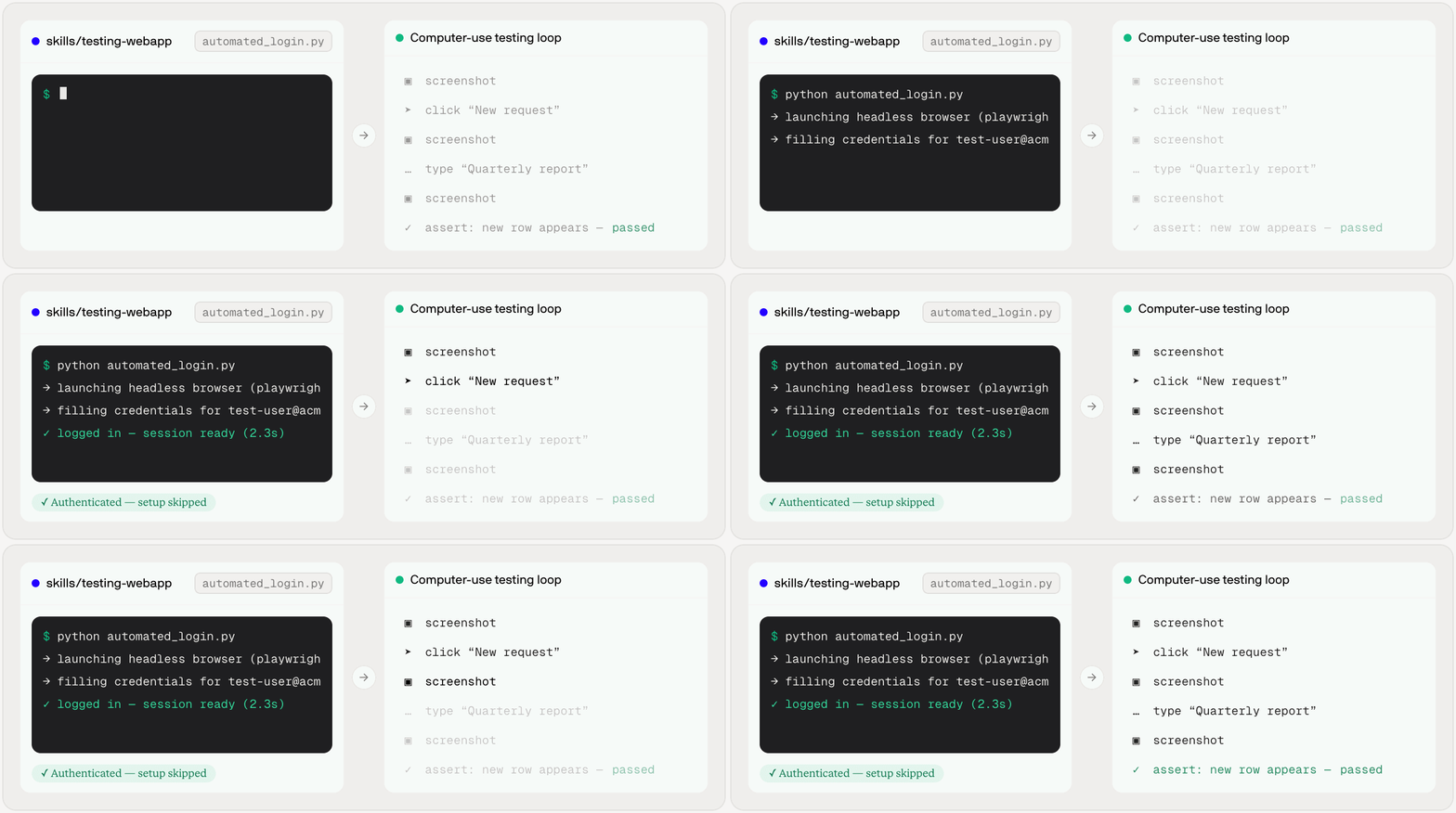
A login skill gets Devin an authenticated session in seconds, so the run spends its time in the click / screenshot / assert loop that proves the change.
We’re also experimenting with routing the testing phase to different models. Since testing leans on different strengths than writing code, like reading screenshots, tracking UI state, and deciding the next browser action, some models are simply better at this than the typical one you’d pick for editing code.
Using Autonomous Testing in Devin Today
Devin currently enters test mode in two ways: an explicit ask to test a change, or, after Devin creates a PR it will offer to test the change if applicable. From there, it will create the test plan and start getting to work.
Oftentimes when you are first starting to use Devin’s testing capabilities it will need your assistance. A good example is if it requires secrets when running your app locally. To make this process smoother, Devin is able to ask you in the session for any credentials or other information that may be missing. For more difficult cases, you can take over Devin’s computer and enter things like OTP codes. The good news is once Devin is done setting up your repo, it is able to save a declarative configuration in the form of a YAML blueprint that produces a snapshot for every future session to boot from.
What you get back
When Devin finishes testing, it doesn’t just tell you whether the app worked. A raw screen recording is useful but we felt it wasn’t enough on its own - you need to understand what you’re looking at, why Devin took each action, and which parts of the test passed or failed.
For a quick review, Devin will return a test report with labeled screenshots from key moments in the run so you can quickly see what Devin tested and what the app looked like along the way.
If you want a deeper review, Devin also produces a test video with a rich player UI that has chapters to let you jump between testing sections, scrub through the full run, and inspect the assertions that passed or failed in a chronological list view. In post processing, the dead time between actions is compressed while the moments around actions play back at normal speed. This makes it so a long run condenses into a recording you can actually watch. These artifacts are available in our web interface and also distributed to Slack if Devin was started from there.
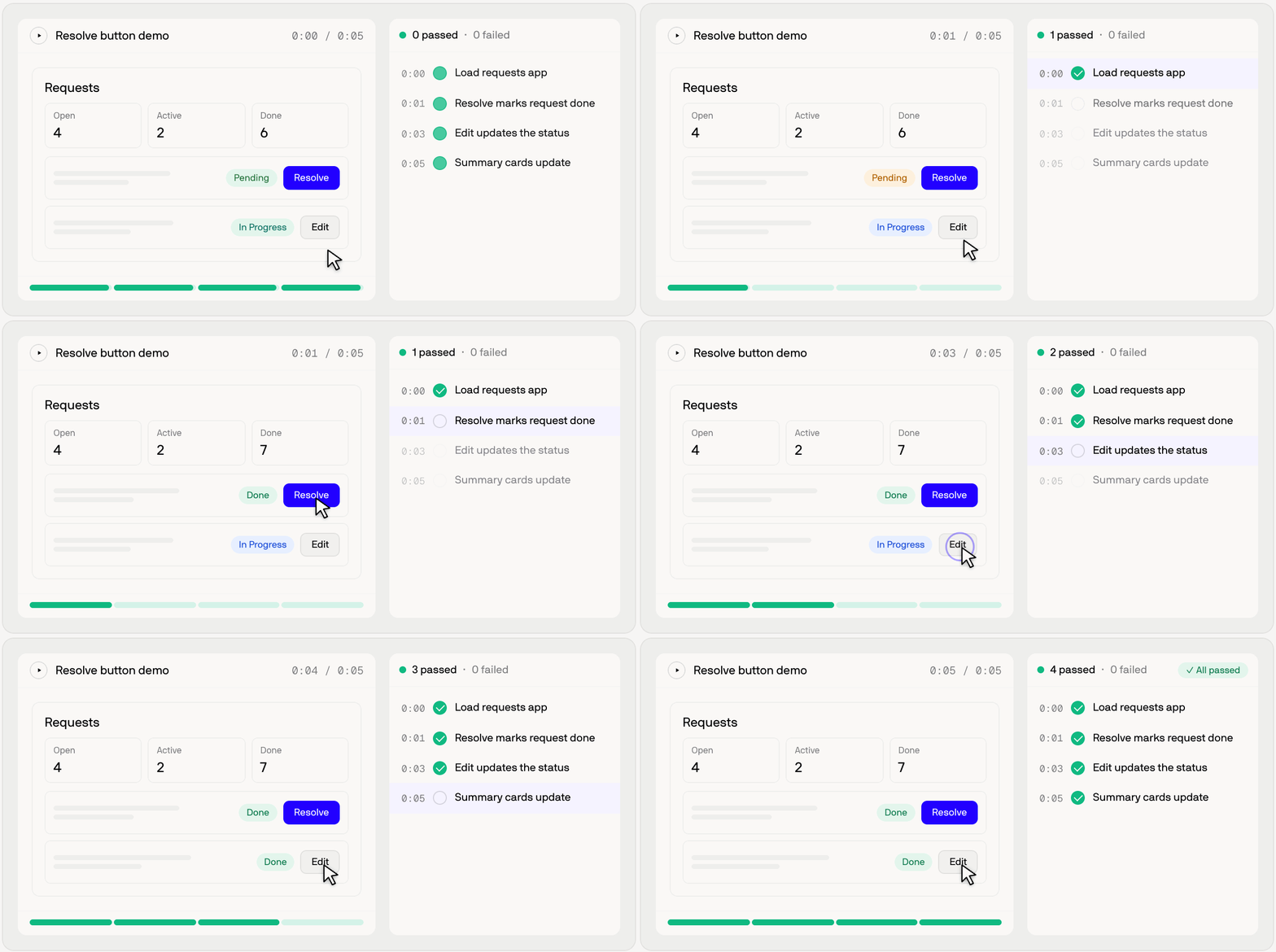
Devin runs the app, exercises the flow, and returns a recording with chapters and pass/fail assertions.
Hard edges
Computer use still has hard edges. One example is timing - if Devin is testing a toast notification, a screenshot taken too early or too late can miss the toast entirely and the models can get confused about whether the expected behavior actually happened.
Another failure mode is cheating. Left to their own devices, the models may sometimes lean too heavily on executing JavaScript in the browser to trigger states programmatically instead of clicking through the UI. This can be helpful to test functionality, but users will often want to see Devin exercise the app the way a real user would.
We’re actively working on these issues through improved evals, tighter guardrails in the harness, and each new generation of models that gets better at computer use.
The future of async development is verified
In the past couple of months, test runs approved per day on Devin have more than doubled. That growth reflects something simple: async agents are only useful if developers can trust what they come back with. Often that trust can’t come from code alone: for many changes, you want to know that the app was actually run, the important flows were exercised, and the result was captured in a way you can easily inspect.
That’s what autonomous testing in Devin is designed to provide. Devin plans the test, operates the app, records and annotates what happened, and finally returns artifacts that make the result reviewable. There’s still a lot to improve, but we think this is the right shape of the future: agents that don’t just complete work asynchronously, but come back with proof.
We’re constantly surprised by how much time Devin saves us by testing its own work, and feel that many customers still underutilize Devin’s automated testing feature. To support experimentation, we are currently billing at 1/5th the normal usage cost while in test mode.
Try our work at app.devin.ai or windsurf.com. And if working on problems like these sounds fun, reach out me at ido at cognition.ai


